KalendarWeek#
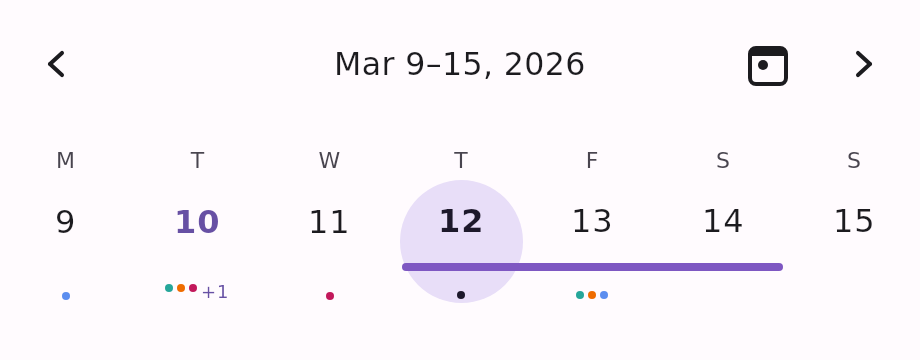
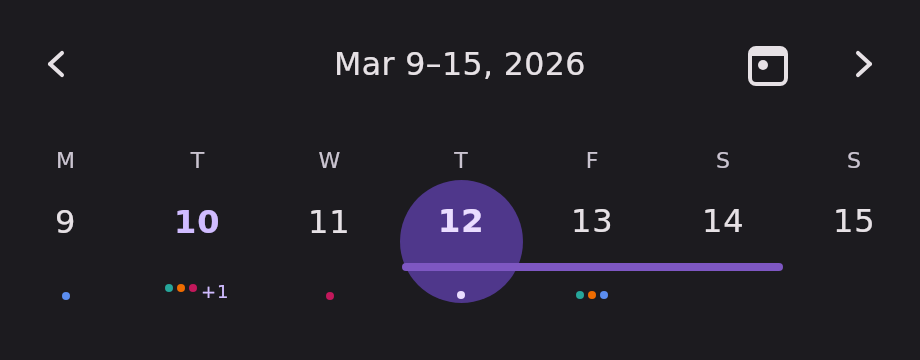
A single-week row, paged by week. The header's arrow buttons and a horizontal swipe on the row drive
the same KalendarViewState, so the two input methods can never desync.
Use it as a compact date strip above a day's content — the shape most "week view" screens want.
Minimal example#
import androidx.compose.runtime.Composable
import androidx.compose.runtime.getValue
import androidx.compose.runtime.mutableStateOf
import androidx.compose.runtime.remember
import androidx.compose.runtime.setValue
import com.himanshoe.kalendar.KalendarWeek
import com.himanshoe.kalendar.state.rememberKalendarWeekState
import kotlinx.datetime.TimeZone
import kotlinx.datetime.todayIn
import kotlin.time.Clock

@Composable
fun WeekStrip() {
    val today = remember { Clock.System.todayIn(TimeZone.currentSystemDefault()) }
    val state = rememberKalendarWeekState(initialDate = today)
    var selected by remember { mutableStateOf(setOf(today)) }

    KalendarWeek(
        selectedDate = today,
        state = state,
        selectedDates = selected,
        onDateClick = { date, _ -> selected = setOf(date) },
    )
}Parameters#
| Parameter | Type | Default | Description |
|---|---|---|---|
selectedDate | LocalDate | — | Default single-selection highlight, and the initially visible week when state is left at its default. Superseded by selectedDates when that is passed. |
modifier | Modifier | Modifier | Applied to the outermost container. |
state | KalendarViewState | rememberKalendarWeekState(selectedDate) | Navigation state. Hoist it to read visibleDate or navigate from your own UI. |
events | List<E> | emptyList() | Shown as indicator dots on day cells, and as span bars for multi-day events. |
selectedDates | Set<LocalDate> | setOf(selectedDate) | The highlighted dates. Hoist your own set for multi-select or range. |
onDateClick | (date: LocalDate, events: List<E>) -> Unit | no-op | Called when a non-disabled date is tapped, with that date's events. |
onDayEventClick | ((event: E) -> Unit)? | null | Called when an individual event is tapped inside a day cell's +N overflow popover. |
onDateRangeSelect | ((start: LocalDate, current: LocalDate) -> Unit)? | null | When non-null, press-and-hold then drag selects a range live. Called continuously with the pressed date and the date under the pointer. |
onDateRangeSelectEnd | (() -> Unit)? | null | Called once when a drag started by onDateRangeSelect ends. |
config | KalendarViewConfig | KalendarViewConfig() | Shared visual and behavioural settings. See Configuration. |
header | @Composable (KalendarHeaderScope) -> Unit | KalendarHeaderDefaults.Header | Replaces the navigation header above the row. See Customization. |
dayOfWeekLabel | @Composable (DayOfWeek) -> Unit | KalendarHeaderDefaults.DayOfWeekLabel | Replaces the content of each weekday column header. |
dayContent | (@Composable (scope: KalendarDayScope<E>) -> Unit)? | null | Replaces the built-in day cell entirely. See Customization. |
State factory#
rememberKalendarWeekState — the same factory KalendarScheduleWeek uses.
val state = rememberKalendarWeekState(
    initialDate = today,
    startDayOfWeek = DayOfWeek.SUNDAY,
    minDate = LocalDate(2020, 1, 1),
    maxDate = LocalDate(2030, 12, 31),
)| Parameter | Type | Default | Description |
|---|---|---|---|
initialDate | LocalDate | today | The week initially visible. |
startDayOfWeek | DayOfWeek | MONDAY | The row's first column. |
minDate | LocalDate? | null | Turns canScrollBackward false once the previous week would start before this date's week. |
maxDate | LocalDate? | null | Turns canScrollForward false once the next week would start after this date's week. |
See Views for everything KalendarViewState exposes.
The week title#
The built-in header keeps the title as short as the week allows, repeating the month and year only where they actually change:
| Week | Title |
|---|---|
| Within one month | Aug 10–16, 2026 |
| Across a month boundary | Aug 28 – Sep 3, 2026 |
| Across a year boundary | Dec 29, 2026 – Jan 4, 2027 |
Month names come from KalendarViewConfig.monthNameFormatter, truncated to
three characters.
Programmatic navigation#
val state = rememberKalendarWeekState(today)
val scope = rememberCoroutineScope()

KalendarWeek(selectedDate = today, state = state)

Button(onClick = { scope.launch { state.animateScrollTo(LocalDate(2026, 12, 25)) } }) {
    Text("Jump to Christmas week")
}
Button(onClick = { scope.launch { state.animateScrollToToday() } }) {
    Text("Today")
}
The header's built-in today button calls animateScrollToToday() internally — this is the same
navigation, triggered from your own chrome.
Drag to select a range#
Press and hold a date, then drag: the selection updates live as the pointer moves. A long press is
required before the drag starts, so an ordinary tap still goes to onDateClick.
val selection = rememberKalendarSelectionState(mode = KalendarSelectionMode.Range)

KalendarWeek(
    selectedDate = today,
    selectedDates = selection.selectedDates,
    onDateClick = { date, _ -> selection.onDateClick(date) },
    onDateRangeSelect = selection::onRangeDrag,
    onDateRangeSelectEnd = selection::onRangeDragEnd,
)
Leave both callbacks at null (the default) to disable drag-select entirely.
Sliding selection indicator#
When exactly one date is selected, a single shared indicator slides from the previously selected
cell to the newly tapped one, instead of each cell fading independently. It is on by default and
controlled by KalendarViewConfig.showSelectionIndicator.
It also works with a custom dayContent: the indicator is drawn behind the cell, so your own cell
keeps the animation.
Selecting more than one date falls back to per-cell fades — there is nothing to slide between.
What it does not have#
KalendarWeek has no onEventDrop. Drag-to-reschedule across dates is
KalendarMonth only.